Hi.
I’m new here. I’m very adept with adobe illustrator and can generate an outline of EXACTLY what I want my cutter to cut. However cookiecad seems to add an offset. This is offset is not rounded on interior “corner” resulting on a sharp point cutout that I do not want. If I add my own rounded offset (no problem for me to do), then the program adds another on top of that, making the edge very rounded and not conforming to the shape enough.
Is there a way to turn off offset so that the cutter generated is exactly the shape I imported???
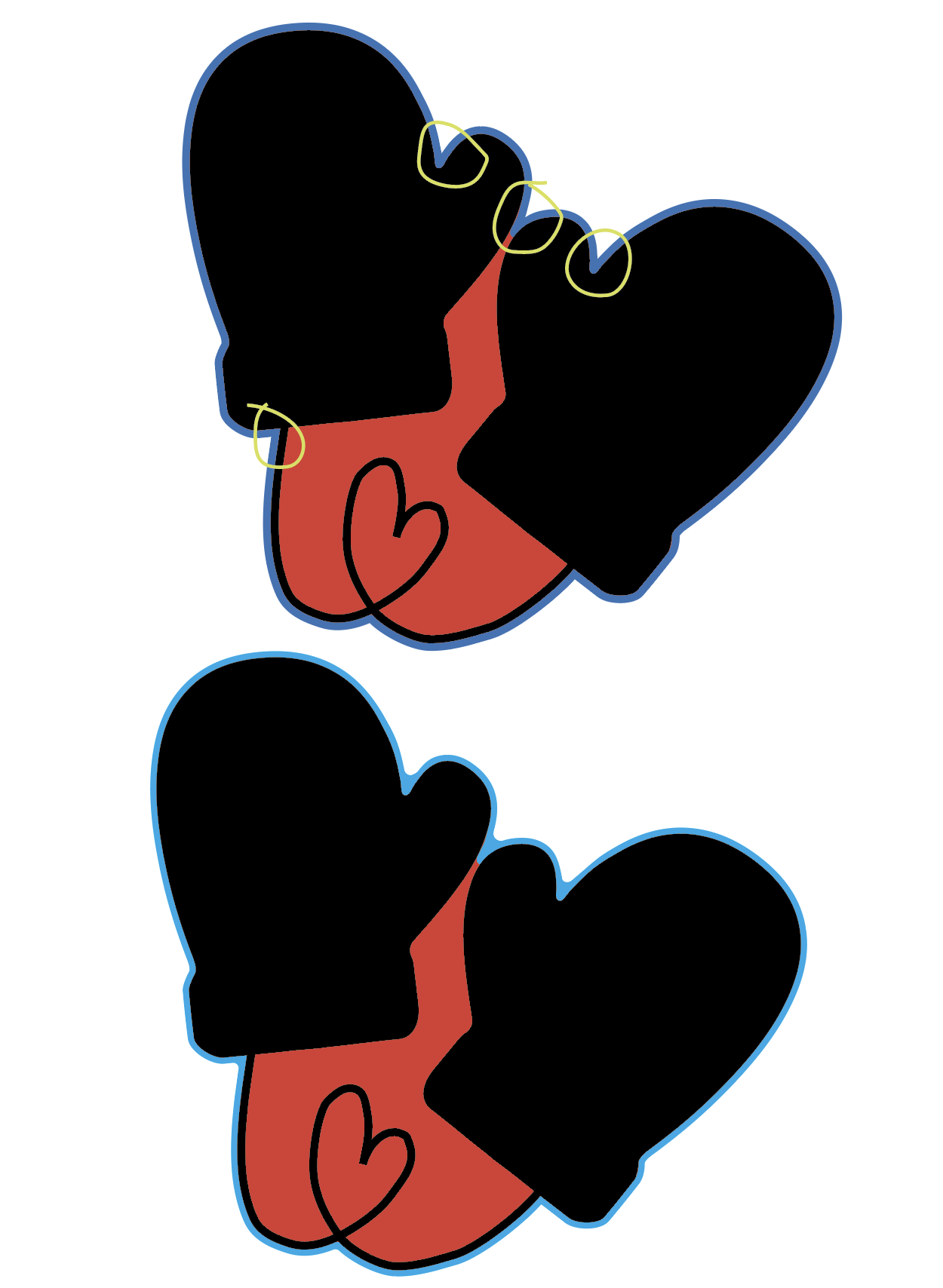
Attached is a picture of what I am talking about. The black is where icing will go, red is the fill of the cutter (those would be combined in one solid shape when imported) The top pic blue shows approximately what offset it generated by cookiecad but the bottom pic blue is what I actually want the cutter to cut. (The yellow circles indicate the areas of concern)
The offset is the thickness of the blade. Since the blade can’t be 0 thickness it must be offset in or out. The default is to offset out since typically, you want the interior of the cutout to match your design. If you want to offset in, you can do so under experimental settings → offset in. This will keep the outer shape matching your image, and the blade will be offset inside.
Let me know if that resolves it!
If that isn’t it - try a cutter without imprint and let me know if the behavior is any different. When there is a stamp there is an additional offset to accommodate the stamp. This is the “gap” setting. You can set it to zero though the cutter and stamp will be overlapping. You can always separate them in your slicer and print them separately instead of one inside the other.
Thanks for the response.
I am not doing an imprint so that is not the issue.
What you are saying about needing an offset for the thickness of the material makes sense. And, yes, I would want that offset to be outside such that the interior edge of the cutter matches the outside of my drawing exactly.
Honestly, it’s hard for me to tell if that is the case in the 3D view. I don’t think it is. It appears to be less rounded than my design - which could happen on interior sharpish curve if any additional offset is added.
Attach is a screenshot of the exact artwork I imported on the right (I did reflect it so it matched the underside of the cutter) and the generated cutter on the left. Those inside edges look sharper to me. Particularly the top one. Am I missing something?
I even tried bringing it into CADit to see if I could see better but they still look sharper as far as I can tell…
I dont work for Cookiecad but I also create my files in illustrator and I use cookiecad for more simple shapes. What I seem to find is that it can’t always exactly follow the paths we make, there are geometries that just dont work as a 3D mesh is made up of tiny triangles, not circles. I think cookiecad may automatically ‘correct’ some shapes and generate the closest match that will work as a printed cutter, rather than just giving you an error that it can’t calculate the shape. Annoying when you’re looking for precision, but it saves a lot of wasted time. You could try upping the resolution setting (more triangles), the maximum is 200. Also try changing to ‘offset in’ as Nathan suggested - which is under the experimental settings, it creates the cutting edge going inwards, you can compensate for lost size by adding your blade width to the measurements to get an exact match - but this might change your shape again.
Sometimes I just have to accept that it won’t be perfect, or turn to fusion to create the files where I have a little more control (but is waaaay more frustrating and still not 100% accurate for curves).
@FableJ@jmtlevitt I would love to investigate this further. We should be able to generate precise shapes - perhaps it is settings or perhaps we need to adjust the code. Can you please share a link to any examples you have - click the share button, next to download. If you don’t want to share it publicly you can email the link to support@cookiecad.